Get the app

How AlbumVault protects your photos, and where it stops

Every statement on this page is checked against the written vault format both apps are built and tested against, and against its security review. If the format does not back it, this page does not say it.

Threat model

What it protects against

Someone holding your unlocked phone

A partner, a child, a friend, a repair shop

  • Every pattern or PIN leads to exactly one vault, and a vault can have more than one way in. A pattern that belongs to no vault opens nothing.§5, §11.2
  • A wrong pattern and a pattern that belongs to no vault look exactly the same: same message, same vibration, same wait.§6, §15.6
  • After 5 wrong tries the app makes you wait: 30 seconds, then 1 minute, 5 minutes, 15 minutes, then an hour for every further try.§11.2
  • A guest vault (Pro) is a second pattern that opens a separate vault with only what you put there.§1, §5
  • On Android, screenshots and screen recording of the vault are blocked. On iPhone, the vault is covered in the app switcher and blurred during screen recording or mirroring.§15.3, §15.4
  • The vault locks when you leave the app (immediately by default), when the screen locks, and after 5 minutes idle.§15.4
  • Face ID or fingerprint can open at most one vault. Your other vaults always need their pattern.§15.1


A copy of the app’s files

A device backup, a forensic extraction, a stolen disk image

  • Every photo and video is encrypted on your phone before it is saved.§1, §9
  • Your pattern or PIN is stretched with PBKDF2-HMAC-SHA512 (600,000 rounds) and combined with a key held in your phone’s Secure Enclave (iPhone) or StrongBox/TEE (Android), so it can only be tried on your phone.§5.1, §5.3, §10.1
  • Every pattern or PIN attempt goes through a key that stays in your phone’s security chip, so a copy of the vault files cannot be guessed at on another computer.§1, §5.3
  • Thumbnails, album names and the album index are encrypted like the photos. Nothing about a vault is kept outside its encrypted files: no names, counts, recents or search index.§9, §10
  • Stored files are padded to a fixed ladder of sizes, so a file’s size on disk no longer pins down the original file.§8
  • Vault files are left out of your phone’s own iCloud or Google device backup. Backing up a vault is a separate, encrypted step you control.§10, §10.2

Wherever you keep a backup file

A cloud drive, a computer or a USB drive

  • Save an encrypted backup file of a vault to Files, a computer or a drive you trust. Only its 12-word recovery phrase opens it.§13.2
  • There is no AlbumVault server, so there is no AlbumVault account to sign up for. We never have your photos or your keys, so we have nothing to hand over.§1, §13

Being forced to open the app

Someone who makes you unlock it in front of them

  • AlbumVault keeps no list and no count of your vaults, and each vault’s files look alike.§1, §10.3
  • The key files are mixed with 4 to 16 random decoy files that look exactly like real ones, so the number of key files does not tell how many vaults exist.§6, §10.3
  • Draw your emergency pattern and AlbumVault opens your chosen vault and permanently removes access to every other vault on this phone, with no prompt. It needs a second vault, which is part of Pro.§11.3, §12
  • Backup files you saved are not touched: a vault removed by the emergency pattern comes back only from its backup file, with its recovery phrase.§12, §13.2

What it does not protect against

The limits, in plain words

No app can protect everything. These are the cases outside what AlbumVault is designed for.

  • AlbumVault does not hide that some private data exists: your phone’s storage settings, and a forensic examiner, can still show that. Deleting is not shredding: a lab that images the phone may recover deleted bytes. Use AlbumVault to keep people out of your photos, not to beat a forensics lab.
  • AlbumVault cannot protect against malware or a jailbroken or rooted phone running code while the vault is open, against what is on screen or shared out once decrypted, or against someone deleting files they can reach (they can destroy data, not read it).
  • The hardware key cannot move to a new phone, so on a new phone, or a phone restored from a backup, a vault opens only with its recovery phrase. Keep the phrase safe before you switch phones.
  • The phone’s camera indicator still lights up when the photo is taken, so the person may notice.

Specification

The technical details

For readers who want the exact building blocks. Section numbers refer to the vault format specification.

File encryption AES-256-GCM, Tink AES-GCM-HKDF streaming AEAD (AES256_GCM_HKDF_1MB): a fresh key per file, 1 MiB segments, each authenticated §2, §9
Pattern and PIN stretching PBKDF2-HMAC-SHA512, at least 600,000 iterations, one random salt per phone §5.1, §10.1
Hardware binding A non-exportable key in the Secure Enclave (iPhone) or StrongBox, else the TEE (Android), is mixed into every pattern or PIN attempt, so guesses cannot be precomputed off the phone. It does not rate-limit guesses made on the phone §5.3
Key derivation HKDF-SHA256 (RFC 5869) over the stretched credential and the per-attempt hardware mix §2, §5.1
Key slots One 4,096-byte AES-GCM file per way in, named from the secret; 4 to 16 random decoys that look identical §6, §10.3
Recovery phrase BIP-39, 12 English words from 128 bits of randomness, one per vault, never stored by the app §4
Size padding Padmé with a 4,096-byte floor: at most 6.25% overhead for 4 to 64 KiB files, about 3.12% above that §8
Break-in photos HPKE (RFC 9180): X25519, HKDF-SHA256, AES-256-GCM, sealed to a key only the owning vault holds §2, §14
Backup and transfer file One .avbundle file per vault, the same on iPhone and Android, that opens with the recovery phrase only. A restored file is treated as untrusted and checked in full before anything is added §13
Third-party code No analytics, ad or tracking SDKs. Crypto comes from the operating system (CryptoKit, CommonCrypto) and Google Tink on Android. Purchases use Apple StoreKit or Google Play Billing §15.2, D1

The iPhone and Android apps are written separately but held to one written vault format, and both must pass the same test vectors, so a vault made on one opens on the other.

FAQ

Security questions

Is AlbumVault safe? Can it be hacked?

Every photo and video is encrypted on your phone before it is saved. Every pattern or PIN attempt goes through a key that stays in your phone’s security chip, so a copy of the vault files cannot be guessed at on another computer. No app can promise it cannot be hacked. AlbumVault cannot protect against malware or a jailbroken or rooted phone running code while the vault is open, against what is on screen or shared out once decrypted, or against someone deleting files they can reach (they can destroy data, not read it).

Can AlbumVault see my photos?

No. There is no AlbumVault server, so there is no AlbumVault account to sign up for. We never have your photos or your keys, so we have nothing to hand over.

Can you reset my pattern if I forget it?

No. Each vault has its own 12-⁠word recovery phrase (BIP-⁠39), shown once. We never see it and cannot reset it. If you forget your pattern, the phrase gets you back in.

Can someone tell that I have a second vault?

AlbumVault keeps no list and no count of your vaults, and each vault’s files look alike. AlbumVault does not hide that some private data exists: your phone’s storage settings, and a forensic examiner, can still show that. Deleting is not shredding: a lab that images the phone may recover deleted bytes. Use AlbumVault to keep people out of your photos, not to beat a forensics lab.

What happens to my vaults if I switch phones?

The hardware key cannot move to a new phone, so on a new phone, or a phone restored from a backup, a vault opens only with its recovery phrase. Keep the phrase safe before you switch phones.

Do the iPhone and Android apps use the same encryption?

Yes. The iPhone and Android apps are written separately but held to one written vault format, and both must pass the same test vectors, so a vault made on one opens on the other.

AlbumVault for iPhone and Android

Your photos, your pattern, your phone

  • Encrypted on this phone
  • Each pattern leads to one vault
  • No account needed
Download on the App Store (coming soon)Get it on Google Play (coming soon) Coming soon to both stores
See what it does
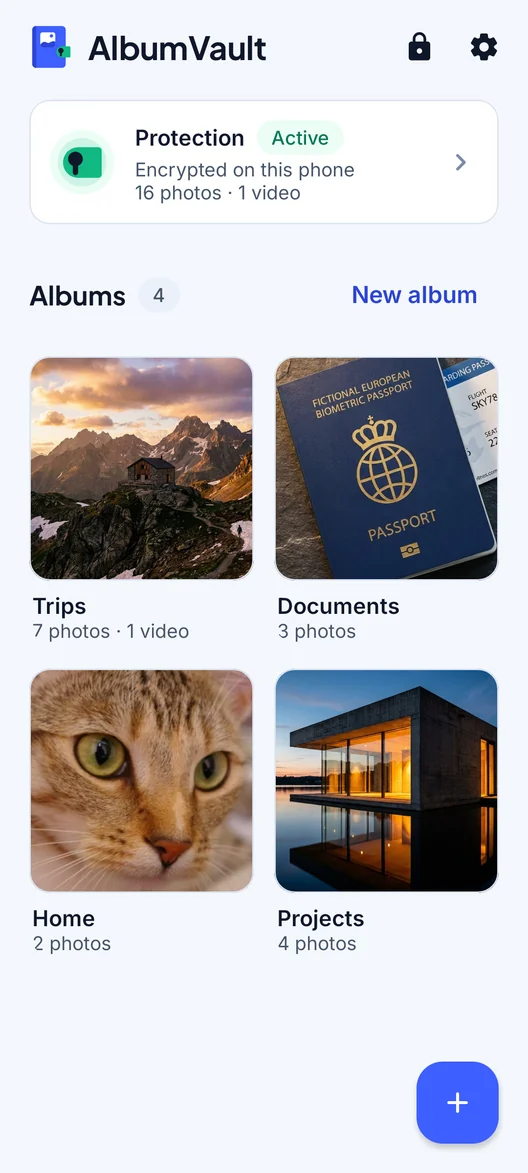
AlbumVault on Android: the Albums screen with Protection active, encrypted on this phone, and four albums